Tutorial
How to Build a Car Rental Booking and Invoice App Without Coding
Plan and build a tested car rental booking and invoice MVP with an AI desktop workspace, from data model and pricing rules to privacy and deployment.
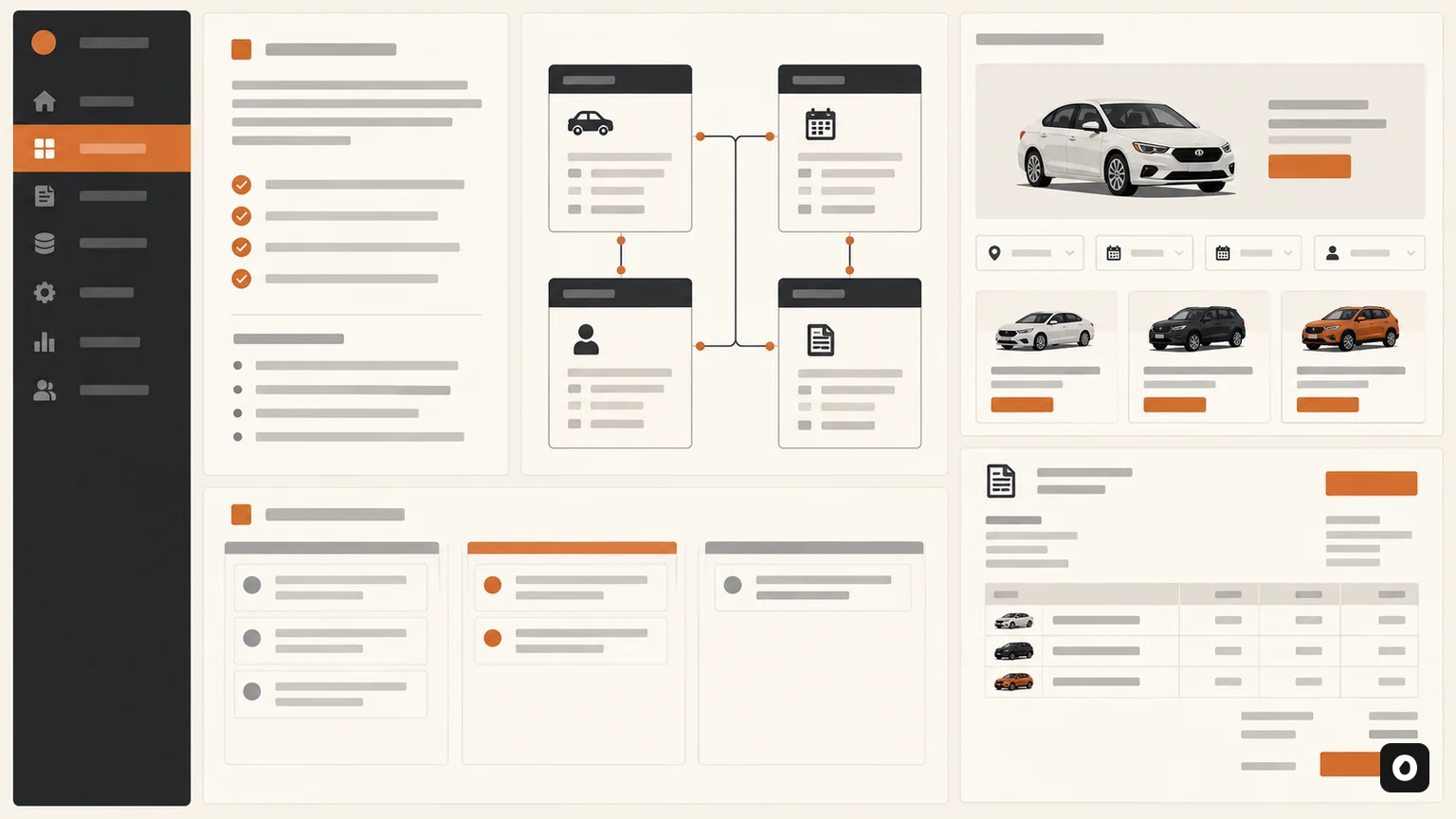
This practical tutorial shows how a non-developer can plan, build, and validate a car rental booking and invoice MVP with an AI desktop workspace. The goal is not a disposable demo: it is a small, coherent product with clear data, reliable calculations, sensible permissions, and a path to production.
What you will build
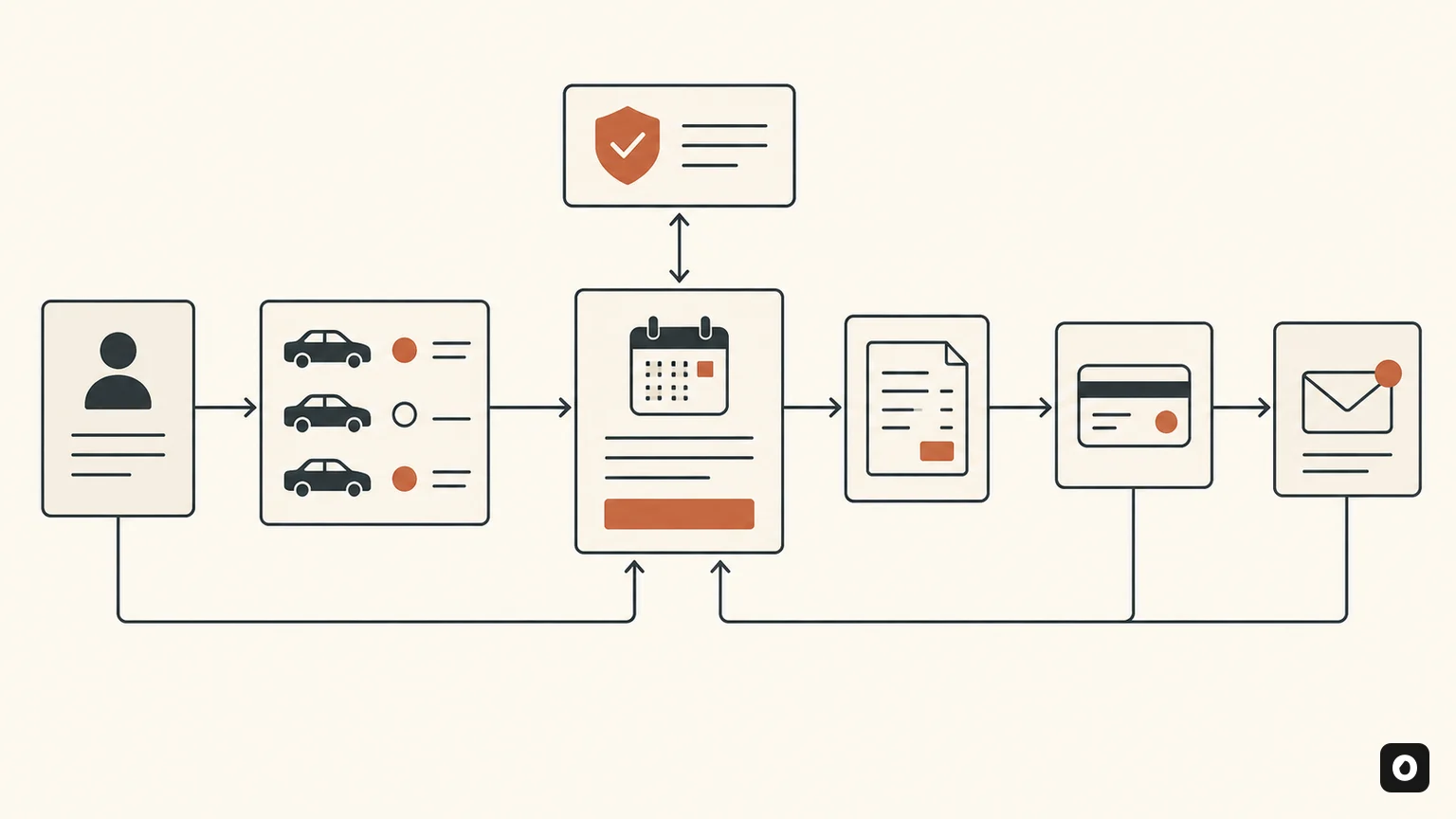
The application will maintain customers and vehicles, show availability, create a booking, calculate a quote, record pickup and return information, and produce an invoice. A dashboard will summarize active reservations, vehicles due back, unpaid invoices, and maintenance blocks. Staff will be able to search by customer, registration number, booking reference, or date. The tutorial keeps the first version deliberately narrow so that each rule can be understood and tested.
You will use the Omega Plus Sandbox desktop workspace to describe the product, organize project files, review proposed changes, and run checks. Sandbox currently provides Chat, Cowork, and Code surfaces, workspace-aware file and shell tools subject to the permission mode you choose, plus Fast and deeper workflow options. It does not automatically host the finished application or activate payments. Deployment, production identity, and live financial integrations remain separate steps.
No prior programming knowledge is required to follow the planning method, but “without coding” does not mean “without decisions.” You are still the product owner. You will define rules, approve changes, inspect results, and decide when the application is safe to use. AI can translate intent into implementation, but it cannot know your local tax rules, rental agreement, insurance terms, or operational policy unless you supply and verify them.
Before you start: define the business boundary
Write down the exact business you are modeling. Is it one rental location or many? Are prices daily, hourly, or both? Can a customer reserve a vehicle category, or must they select a particular vehicle? Are drivers required to upload documents? Which currency and tax regime apply? Does an extension require staff approval? A vague prompt such as “build a car rental app” forces the model to invent these answers. A one-page operating brief gives the project a stable foundation.
For this tutorial, assume one location, daily rentals, a specific vehicle per booking, manual verification of driving documents, one currency, configurable tax, and payment status recorded manually. Online card processing, automated identity checks, telematics, and multi-location inventory are out of scope. A future version can add them behind clear interfaces. This boundary protects the first release from turning into a collection of half-built features.
Create a folder named car-rental-mvp and a plain-language file named PRODUCT.md. Describe the users—front-desk staff, manager, and customer—the core journey, out-of-scope items, and the definition of success. A successful first release can create a conflict-free booking, calculate an explainable quote, complete a return, and issue an accurate invoice. Everything else is secondary.
Step 1: install and prepare Sandbox
Download the build for your operating system from the Sandbox product page. Open the application, add your Omega Plus API key when prompted, and select the project folder you just created. Choose a conservative permission mode for the first session. File changes should require review until you understand what the agent intends to modify. Shell commands should remain scoped to the workspace.
Start in the planning surface and paste your operating brief. Ask the assistant to restate the requirements, list unresolved decisions, and propose a milestone plan without changing files. This is a useful test: if the summary changes your meaning, correct it before implementation. Ask for assumptions to be written into PRODUCT.md only after you approve them.
If you prefer a terminal workflow, the Omega Code agent can work with the same repository-aware discipline. Use one primary interface during the tutorial so changes remain easy to follow. Switching tools mid-task can be useful later, but it adds unnecessary cognitive overhead while the domain model is still evolving.
Step 2: write a product prompt that can be tested
A strong product prompt separates outcome, users, rules, constraints, and acceptance criteria. Tell the assistant to create a responsive internal web application for a single-location car rental business. Specify the required pages: dashboard, vehicles, customers, bookings, booking detail, invoices, and settings. Request a simple local development database, sample data, and tests. State that monetary values must use integer minor units rather than floating-point arithmetic.
Then provide the core rules. A vehicle cannot have overlapping confirmed or active bookings. A maintenance block makes it unavailable. A quote equals the daily rate multiplied by billable days, plus approved extras, discount, tax, deposit, and later adjustments. The invoice must preserve the price terms used at booking time even if the vehicle’s default rate changes. Status transitions must be explicit and invalid transitions must be rejected.
Finish with acceptance criteria written as observable scenarios. For example: “Given a confirmed booking from 10 October through 12 October, when staff search the same vehicle for overlapping dates, it is unavailable.” Another: “Given a returned vehicle with an approved late fee, the final invoice shows the original rental subtotal, the fee, tax treatment, payments, and balance.” Scenarios prevent the project from being judged only by whether the screens look complete.
Step 3: design the data model before the pages
Ask the assistant to propose entities and relationships, then review them in plain language. A customer record needs a stable identifier, contact information, document-verification status, and timestamps. A vehicle needs registration, make, model, category, status, daily rate, odometer, and maintenance notes. A booking connects one customer and one vehicle to pickup and return times, pricing terms, deposit, status, and notes. An invoice connects to the booking and stores immutable line items.
Do not store every concept in one booking table. Invoice line items need their own records so charges remain explainable. Payments need amount, method, reference, date, and status. Vehicle blocks need a reason and date range. Audit events should record important changes such as confirmation, cancellation, pickup, return, and invoice finalization. Separation makes later reports and corrections possible.
Ask for a diagram and a written data dictionary. Every field should have a purpose, type, required rule, and privacy classification. Avoid collecting information “just in case.” Driving documents and addresses are sensitive, so the first MVP can record verification status without storing document images. If you later add file storage, define retention and access before upload. The planned Omega Secure layer is relevant to such privacy controls, but it is still in development and should not be treated as a current compliance guarantee.
Step 4: model the booking lifecycle
Status is not decorative text; it is the backbone of the workflow. Use a small state model such as draft, quoted, confirmed, active, completed, cancelled, and no-show. Define who can trigger each transition and what conditions must be true. A draft can become quoted when dates, customer, vehicle, and pricing are present. A quote can become confirmed after document review and deposit policy are satisfied. A confirmed booking can become active at pickup.
Invalid transitions must fail clearly. A cancelled booking cannot become active. A completed booking should not be silently edited; adjustments should create an auditable correction. A vehicle should change operational status only through defined events, not because a page happens to save a form. Ask the assistant to put lifecycle logic in one service or domain module rather than duplicating it across screens.
Then request tests for every allowed and rejected transition. Tests should use realistic timestamps and edge conditions: pickup earlier than planned, return after midnight, cancellation after confirmation, maintenance added after a quote, and attempted double booking. This is where AI-assisted building becomes reliable: the model writes implementation and verification together, while you confirm that the business rule is correct.
Step 5: implement availability correctly
Availability looks like a calendar feature but is really an overlap rule. Two date ranges overlap when the new start is before the existing end and the new end is after the existing start. Decide whether return and pickup at the same timestamp are allowed, and apply that convention everywhere. Include confirmed and active bookings plus maintenance blocks. Draft quotes may or may not hold inventory; choose a policy rather than leaving it ambiguous.
Ask the assistant to implement one availability function used by search, booking validation, and calendar views. The database should enforce consistency as far as the chosen technology allows, while the application produces a friendly conflict message. A visual calendar is helpful, but it cannot be the only control. Two staff members can submit overlapping bookings at nearly the same time, so confirmation needs a transaction that rechecks availability.
Create tests for partial overlap, full containment, exact boundaries, different vehicles, cancelled bookings, and maintenance. Also test time zones. Store timestamps in a consistent standard and display them in the business location’s time zone. A rental that crosses a daylight-saving boundary should not change the agreed billable-day rule accidentally.
Step 6: make pricing explainable
Represent money as integer minor units—paise for rupees, cents for dollars—plus an explicit currency. Floating-point arithmetic can produce rounding errors. Store the daily rate captured at booking time. Define billable days: calendar days, 24-hour periods, or started days. Define tax rounding, discounts, deposits, and late fees. Your accountant or local adviser should confirm the real policy before production.
Ask for a pure pricing function that receives booking terms and returns line items and totals without reading or writing the database. Pure functions are easy to test. The quote screen should show rental subtotal, each extra, discount, taxable amount, tax, deposit due, and estimated total. The final invoice should distinguish estimate from actual adjustments and show payments and remaining balance.
Write table-driven tests covering one-day rental, multiple days, zero discount, percentage discount, fixed discount, tax-inclusive or tax-exclusive treatment according to your chosen rule, late fee, damage adjustment, partial payment, and refund. Include large values and invalid negative inputs. Never ask a language model to “calculate correctly” only in prose; make the result a deterministic function backed by tests.
Step 7: build the staff interface around decisions
The dashboard should answer operational questions, not display decorative charts. Which vehicles are going out today? Which are due back? Which returns are late? Which bookings need document review or payment? Which vehicles are unavailable for maintenance? Each item should link to the record that needs action. Keep aggregate numbers secondary to the work queue.
On the booking form, guide staff through dates, availability, customer, price, extras, and review. Do not show every field at once. The final review should summarize the vehicle, customer, pickup and return, price breakdown, deposit, and policy acknowledgements before confirmation. The booking detail page should display lifecycle status and a chronological history.
Use consistent components for forms, errors, badges, tables, and confirmations. The planned Omega UI Library will provide reusable foundations for AI experiences, but it is not currently a downloadable dependency. For this MVP, ask the assistant to create a small local component set and document its states. Accessibility requires keyboard navigation, visible focus, associated labels, meaningful headings, and errors that do not rely on color alone.
Step 8: generate invoices without hiding the numbers
An invoice is an accounting record, not a screenshot of the booking form. Give it a unique sequence generated safely, issue date, customer details, supplier details, booking reference, currency, line items, tax, payments, and balance. Decide when an invoice becomes final. Before finalization it may be a preview; afterward, changes should use adjustments or credit notes according to your policy.
Ask the assistant to generate print-friendly HTML first. Browsers can print or save it as PDF, and the same document remains accessible. Verify page breaks, long customer names, many line items, and currency formatting. Do not embed secrets or internal notes. If regulations require particular tax fields, add them only after professional review.
Voice can later improve accessibility or operational reminders. For example, approved pickup instructions could be rendered through the Omega Voice 1 API. Keep this outside the initial booking transaction: the invoice should succeed even when speech generation or notification delivery is unavailable.
Step 9: add roles, privacy, and audit history
Define at least staff and manager roles. Staff can manage customers, quotes, bookings, pickup, and return. Managers can change pricing defaults, issue adjustments, access reports, and manage users. If the application will face customers, create a separate customer identity and data path rather than exposing the staff interface with hidden buttons. Authorization must be enforced on the server, not only in the browser.
Collect the minimum personal data. Mask document identifiers where possible, never store API keys in source files, and keep production secrets in the deployment environment. Add retention rules for inactive customers and audit records. Logs should record identifiers and actions without copying complete personal records. Privacy Shield in Sandbox is optional and composer-focused; it is not a substitute for application-level data protection or full DLP.
Audit events should answer who changed what, when, and through which action. Do not store hidden model reasoning. Record the resulting operation and relevant business context. If an assistant proposes a change, preserve the human approval separately. These records make disputes and incident investigation manageable.
Step 10: add AI only where it improves the product
The booking core does not need a model. Availability, price, state transitions, and invoices should remain deterministic. AI can help search natural-language notes, summarize a customer history for authorized staff, draft a rental description, explain an invoice, or turn a manager’s question into a report request. Keeping these enhancements outside the transaction protects the core when inference is slow or unavailable.
For an application integration, use the Omega Plus Messages endpoint through a server-side function. Never expose the API key in browser code. Select from the available public model identities based on the task and test with realistic inputs. Log request identifiers, latency, and outcome, but not private prompt content unless your policy explicitly permits it.
Give AI features a graceful fallback. If an invoice explanation fails, the invoice remains visible. If natural-language search fails, structured filters still work. Validate any structured output before it affects the database. AI should make the experience more helpful, not become a single point of failure.
Step 11: test like a rental operator
Ask the assistant to create unit tests for pricing, overlap, and lifecycle rules; integration tests for booking confirmation and invoice creation; and browser tests for the main staff journey. Then test manually with realistic scenarios. Create two similar vehicles, customers with long names, bookings across month end, a maintenance block, a late return, partial payment, cancellation, and an attempted conflict.
Test failure behavior. What happens if the user refreshes during confirmation, clicks twice, loses connection, or submits stale availability? The application should not create duplicates. What happens if invoice rendering fails after booking completion? The system should preserve the completed booking and allow invoice generation to be retried. What happens if a user lacks permission? The server should reject the action and the interface should explain the next step without revealing protected data.
Ask for a final verification report listing commands run, tests passed, known limitations, and manual checks still required. Review actual evidence rather than accepting “everything works.” The Omega Skill Library is planned as a set of reusable expert workflows, but for now keep your tested project checklist inside the repository so every future change follows the same standard.
Step 12: prepare for deployment
Choose hosting that supports the application runtime, database, backups, TLS, secret management, and monitoring. Development data must not become production data accidentally. Create separate environments and keys. Apply database migrations through a repeatable process. Back up before migration and test restoration, not only backup creation. The planned Omega Cloud is an in-development deployment layer; this tutorial does not assume it is available.
Set health checks and alerts for application errors, database failures, slow requests, failed invoice jobs, and capacity. Add a privacy notice and operational contact. Restrict the first release to a small group of staff, watch real workflows, and compare invoices with your existing process. Keep an export path so business records are not trapped in the application.
Production readiness is a decision, not a build status. A successful local demo proves the interface can run. It does not prove legal compliance, financial accuracy, security, backup recovery, or staff readiness. Use qualified local professionals for tax, contract, insurance, and privacy obligations.
A copyable prompt sequence
- Plan: “Read PRODUCT.md. Restate the scope, list unresolved decisions, and propose milestones. Do not edit files.”
- Architecture: “Propose the smallest architecture and data model that meets the accepted scope. Explain trade-offs in plain language.”
- Rules: “Implement booking states, availability, and pricing as isolated domain logic with unit tests. Do not build pages yet.”
- Interface: “Build accessible staff pages using the tested domain services. Show loading, empty, success, and error states.”
- Verification: “Run all tests, exercise the primary journey, inspect changed files, and report evidence plus remaining risks.”
Use each prompt as a checkpoint, not one giant instruction. Review the result and commit a coherent milestone before continuing. Smaller steps make mistakes easier to identify and reverse. If the assistant proposes a dependency or architectural change, ask why it is required, what simpler alternative exists, and how it will be maintained.
What to build after the MVP
Prioritize improvements based on actual operator pain. Likely candidates include customer self-service, document upload with retention controls, online payment through a compliant provider, vehicle-category search, multi-location inventory, scheduled maintenance, damage inspection, notifications, reports, and accounting export. Add one vertical slice at a time with new acceptance tests.
An MCP connector may later integrate calendars, accounting, or fleet services. Follow the Omega Plus MCP Tools direction for ecosystem updates, but keep third-party operations behind narrow permissions and explicit approval. External integrations introduce their own downtime, rate limits, and data policies; the core application should degrade gracefully.
A retrieval layer can help staff query rental policies and vehicle documents, provided results preserve sources and permissions. That is a possible future role for Omega Bhaskar. It should complement structured booking records, not replace them. Business facts such as balance and availability belong in the database.
Launch checklist
- The product brief, scope, users, and definitions are documented.
- Availability prevents conflicts at confirmation time.
- Money uses integer minor units and tested rounding rules.
- Booking transitions are explicit and covered by tests.
- Invoices preserve booked pricing and show explainable line items.
- Roles are enforced server-side and secrets stay outside the browser.
- Sensitive data collection and retention are minimized.
- Double submission, refresh, timeout, and retry behavior are tested.
- Backups can be restored and migrations are repeatable.
- AI enhancements have deterministic validation and graceful fallback.
- Real staff have completed a supervised pilot.
- Tax, contract, insurance, and privacy obligations have professional review.
Frequently asked questions
Can I really build this without writing code?
You can direct much of the implementation through an AI coding workspace, but you must still make product decisions, review changes, test behavior, and arrange production operations. “No-code” describes the interaction, not the absence of engineering responsibility.
Does Sandbox host the finished application?
No. Sandbox is a desktop workspace for chat, cowork, code, files, and approved tools. Deployment requires a separate hosting environment.
Should AI calculate rental prices?
No. Use deterministic, tested code for pricing, tax, availability, and invoices. AI can explain the result or help staff search, but it should not own the accounting rule.
Can I add payments in the first version?
You can, but a manual payment-status field is safer for a learning MVP. Live payments introduce provider security, webhooks, refunds, reconciliation, and compliance work.
What should I build next?
Observe staff using the MVP and choose the highest-frequency friction. Do not add a large feature roadmap before the booking and invoice loop works reliably.
Editorial and safety note
This tutorial is educational product guidance, not legal, accounting, insurance, security, or tax advice. Product capabilities described as in development are not presented as currently available. Verify the live documentation and obtain qualified advice before using a rental system with real customers or money.